Using Chatsi & Pattern PXM (Amplifi.io) Together
 Ken Garff, Founder
What is Chatsi AI?
Chatsi is an AI-powered sales agent for e-commerce. It uses conversational AI to understand shopper needs, offering personalized product recommendations (as an alternative to site search) and pre-sales assistance by answering product and policy-related questions.
Chatsi's branded sales persona is always in harmony with the brand. Its detailed product information and policy knowledge base can also serve as a first line of defense for common support questions that would otherwise go to human support channels.
Shopping areas of the website like; home page for product search, product details pages (PDP), policies pages, etc. Can be a traditional chat icon or welcome message hovering over the site or embedded as an ‘Ask AI’ button in the theme design.
Pattern PXM (Formerly Amplifi.io)
Pattern PXM (formerly known as Amplifi.io) is a cloud‑based Product Experience Management (PXM) platform that unifies Product Information Management (PIM) and Digital Asset Management (DAM) in one intuitive, AI‑powered hub.
It enables brands to centrally store, organize, enrich, optimize, and syndicate product content (like images, videos, documents, specs, and descriptions) across marketplaces, retailers, and internal teams.
With advanced features such as AI‑driven metadata tagging, content optimization, bulk uploads, customizable exports, and real‑time syndication.
It was integrated into Pattern’s broader ecommerce acceleration suite following Pattern’s acquisition of Amplifi.io as founded by Ken Garff, but now fully rebranded as Pattern PXM.
Pattern PXM is delivered as a fully cloud‑based (SaaS) platform accessible via web browser, with no on‑premises infrastructure required, and offers extensive support resources and APIs.
How to Make the Integration:
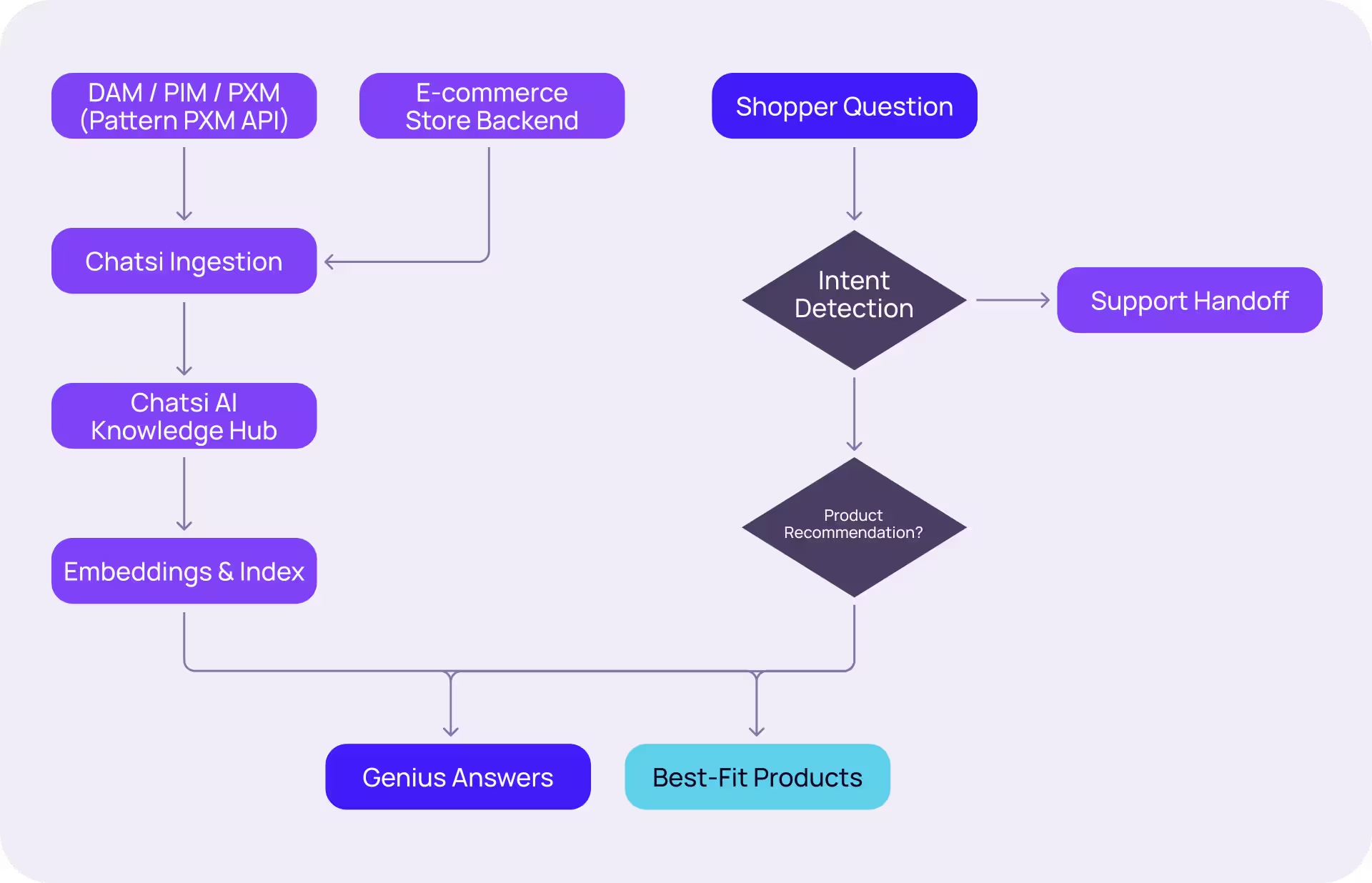
Integrating Pattern PXM and Chatsi AI will greatly accelerate the Chatsi AI knowledge base onboarding process. This is achieved by establishing a new API key for use by Chatsi in the Pattern PCM admin portal. API keys are created in the Pattern PXM admin portal; the key should be kept secret and shared with Chatsi AI using a secure exchange. The Pattern PXM API reference documents the available endpoints.
https://entapi.amplifi.io/docs/index.html
Differences Detailed
- Sales Chat & Pre-Sales Assistance: AI Product Genius provides natural language search and expert pre-sales support.
- Search-as-a-Service: Efficiently find information with intelligent search capabilities.
- First-Line Support: Acts as an initial point of contact for customer support inquiries.
- AI‑Powered PIM & DAM
- Channel Template Automation
- API & ERP Integration
- Self‑Service Knowledge Base
Pattern PXM (DAM/PIM) to Chatsi AI Flowchart